Givenchy Belt QC: Check Size, Hardware, and Edges
| Published | |
|---|---|
| Revised |
## The Givenchy Belt QC Verification Task This Article Solves When buying a belt with a prominent brand logo, QC photos can only help you judge visible size markings, color, hardware structure, edge finishing, and obvious flaws. They cannot alone prove authenticity, material grade, or long-term durability. The core action here is: first open the corresponding product detail page, then click "View QC Photos" on that page, confirm the gallery really belongs to the same item, and finally decide whe
Editor score 4.2 / 5
The Givenchy Belt QC Verification Task This Article Solves
When buying a belt with a prominent brand logo, QC photos can only help you judge visible size markings, color, hardware structure, edge finishing, and obvious flaws. They cannot alone prove authenticity, material grade, or long-term durability. The core action here is: first open the corresponding product detail page, then click "View QC Photos" on that page, confirm the gallery really belongs to the same item, and finally decide whether to request more photos, pause the order, or proceed. 🔍
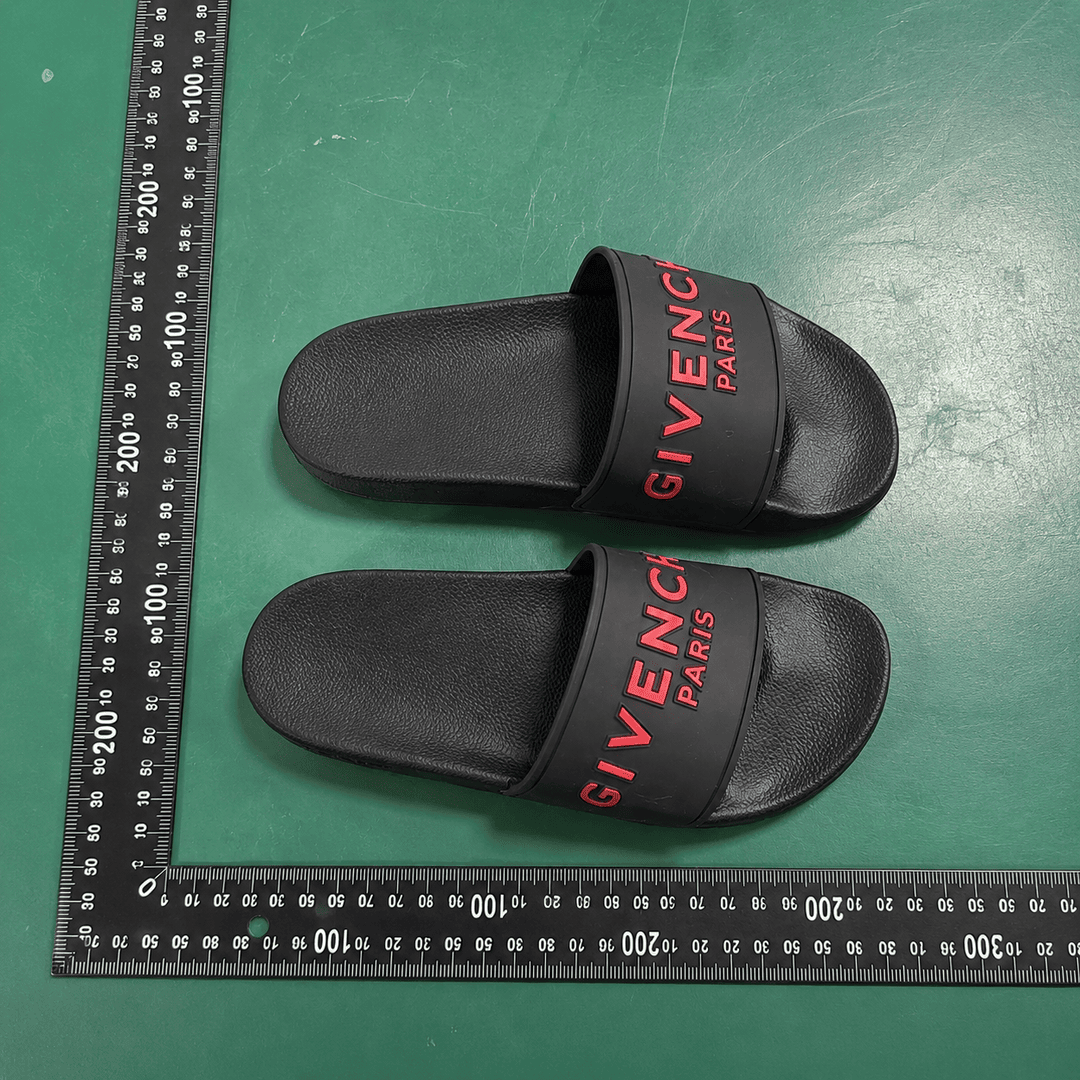
One important evidence boundary first: the QC photos currently specified correspond to Givenchy black slides, not a belt. They serve as a counterexample for how to spot whether the item and the QC gallery match, not as sizing, hardware, or edge evidence for the belt. If the product detail page and the QC gallery show different categories, pause judgment—don't use another item's photos as belt QC evidence.

Caption: This specified image shows the QC entry and product info on the Givenchy black slides product page. The item in the photo is not a belt, so it cannot confirm the belt's sizing, color, hardware, or edge condition.
Confirm Style, Color, Size, and Link from the fashionreps Product Detail Page
The first step is not to hunt for a direct image address, but to enter from the fashion-reps product detail page. Verify that the product name, category, color, specs, reference price, and product link all point to the target belt.
Focus on:
- Is the product category clearly labeled as a belt, not slides, shoes, wallet, or other accessories?
- Does the page color match the order color—black, brown, or a special texture?
- Is sizing expressed as waist, total length, hole range, or just vague S/M/L options?
- Do the main image, product name, and the item shapes in the QC gallery agree?
- Is the reference price only for the product? Service fees, international shipping, and possible taxes still need confirmation on the shopping agent platform.
If the page only has brand tags, search results, or category thumbnails without clear product details, don't treat it as a valid QC source. 🧭
Enter the Real QC Gallery via "View QC Photos"
After confirming the product detail page, use the entry explicitly labeled "View QC Photos" to open the QC gallery. Don't manually construct a QC URL from item numbers, image filenames, or guessed paths—that can easily open another product, old images, or unrelated pages.
Once in the gallery, do identity checks before looking at details:
- Compare the product name or style description to confirm the item in the photos is actually a belt.
- Check the number of photos and angles—whether they include front, back, buckle, strap, holes, and edge areas.
- Note if multiple items are mixed in the same gallery.
- Confirm the images are the product's original QC photos, not category images, brand promos, or other buyers' posts.
- If images fail to load, are empty, or the item's identity can't be confirmed, record the status as insufficient evidence.
The specified image here comes from a page with a "View QC Photos" entry, but the page shows Givenchy black slides. So it demonstrates the entry-recognition method, not the belt's actual condition.
Compare Belt Length, Holes, Width with Page Specs
Specs are the most overlooked part of belt QC photos. A tape measure, tag, or order card in the photo only gives visible clues and cannot replace seller confirmation. Distinguish these length concepts:
- Total length: full length from buckle end to strap tip.
- Usable length: range from the buckle position to the farthest usable hole.
- Waist fit: the waist range the belt can actually cover when worn.
- Strap width: affects whether it fits through belt loops and overall visual proportion.
- Hole spacing and count: determines adjustment range—don't just look at the farthest hole.
Use this verification framework:
| Check item | What QC photos can directly show | What still needs seller confirmation |
|---|---|---|
| Length | Whether a ruler, tag, or measurement is visible | Measuring start point, tolerance, usable length |
| Holes | Hole count, obvious evenness of spacing | Hole spacing, actual waist fit range |
| Width | Relative proportion of strap to buckle | Exact width and whether it fits existing belt loops |
| Color | Surface color and sheen in the photo | Color differences under different lighting, batch variations |
| Size | Whether tag or order info is visible | Whether page specs exactly match the physical item |
If the page specs don't match the tag in the QC photos, don't pick a "looks close" number yourself. Request supplemental photos with a tape measure, full tag, and order identifier. 📏
Inspect Hardware, Closure, Edge Finishing, and Visible Flaws
Hardware and closure structure
First observe whether the buckle, keeper, screws, or other metal parts are complete. The goal is not to judge "does it look authentic" but to record facts supported by the images:
- Any obvious scratches, dents, oxidation spots, or uneven reflections on the buckle surface.
- Any clear misalignment, looseness, or failure to close at the buckle.
- Missing parts or misplacement on keepers, rivets, and connection points.
- Whether metal color matches the product page description.
- Whether key parts are obscured, preventing a judgment.
These observations cannot lead to an authenticity conclusion. Even if hardware looks neat, it doesn't guarantee brand origin or material composition.
Strap and edges
Check if both edges of the strap are straight, and whether edge paint or edge sealing has obvious overflow, cracking, gaps, or fraying. Also look for tears, impressions, or uneven cutting around the holes.
If a photo shows slight shadow, reflection, or indentation, first judge whether it could be caused by the shooting angle. Only record as a visible flaw when it's seen from multiple angles with clear edge outlines.
Stitching, embossing, and logos
If the belt has stitching, embossing, or prints, check:
- Stitch continuity, obvious skipped stitches, broken threads, or loose ends.
- Missing letters, misalignment, blurriness, or ghosting in prints or embossing.
- Whether logo placement matches the style shown on the product page.
- Whether key areas are hidden by folds, shadows, or low resolution.
Don't write "authenticity proof" just because the logo is clear in the photo. QC photos show the state in the photo, not origin, authorization, or authenticity. ⚠️
Separate Visible Evidence, Editorial Judgment, and Unconfirmable Content in QC Photos
When reading QC photos, separate conclusions into three layers.
Layer one is visible evidence, like "in photo 3, a light scratch is visible on the left side of the buckle" or "the current photos don't show the belt tip." Be specific and note the angle or photo number.
Layer two is editorial judgment, like "the scratch may affect appearance, but depth can't be judged from one low-angle photo." This is cautious inference based on visible info, not a stated fact.
Layer three is unconfirmable content: authenticity, leather composition, wear life, actual comfort, colorfastness, and whether new creases will appear in transit. Mark these as unverified, not with conclusive words like "guaranteed," "authentic," or "high quality."
The current photo doesn't match the belt category, so the target belt's length, holes, hardware, stitching, printing, and edge condition all fall under unconfirmable content. 📝
How to Organize Requests for More Photos, Returns, or Order Pause After Finding Issues
If the QC gallery really belongs to the target belt and you find suspected issues, organize requests by severity:
- Insufficient info: request supplemental photos of total length, usable length, strap width, hole spacing, and tip.
- Key parts obscured: request separate photos of buckle front, back, connection points, and keeper.
- Visible appearance issues: point out the specific location and ask the seller to confirm if it's within acceptable range.
- Spec mismatch: pause processing and request confirmation of page specs, order specs, and physical tag.
- Category/gallery mismatch: stop judging from the photos and request rebinding to the correct QC gallery.
Don't publicly share full order numbers, payment cards, passports, addresses, or full shipping labels. Provide only the minimum info needed for that order, and keep original images and communication records. 🔒
Before submitting return or pause requests, confirm the current window, fees, and conditions on the shopping agent platform. Policies may change over time, by seller, and by destination; this article does not replace the platform's latest rules.
Givenchy Belt QC Action Checklist Before Ordering
Before ordering or continuing, check each item:
- Entered from the fashion-reps product detail page, not judged from homepage, category page, or brand page.
- Clicked "View QC Photos" on the page.
- The QC gallery's item category, style, color, and specs match the target belt.
- Saw photos supporting length, hole, and width judgment, or submitted a supplemental request.
- Checked buckle, keeper, connections, edges, holes, and visible surface flaws.
- Recorded visible evidence, editorial judgment, and unconfirmable content separately.
- Did not use another product's photos as evidence for the target belt.
- Did not treat QC photos as guarantee of authenticity or durability.
- Confirmed windows and fee conditions for continuing, pausing, or applying for return.
If you can only see photos that don't match the target belt, the safest action is to pause order processing and request the correct product QC gallery. This may add waiting time but reduces wrong purchases, wrong returns, or later disputes from incorrect evidence. For buyers who can't accept category mismatch, unconfirmed key sizing, or obvious buckle damage, continuing before supplemental photos is not recommended.
Marcus Feldt is Editor in Chief, covering replica sneaker construction, leather grading, stitch and seam durability, and EU import logistics. They write most of the desk's sneaker and leather-goods reviews and maintain its batch-tracking spreadsheet. Tests connect order, warehouse, and delivery dates with bench measurements of weight per shoe, midsole durometer readings, stitch density per 10 mm, and a 30-cycle lace abrasion check. Before wear testing begins, Marcus photographs all six sides of the item and its box label, bringing arrival records, construction measurements, and batch tracking into the review.